Baby's First Port-Scanner
My first Python port scanner was supposed to be a simple SANS lab to create my first port-scanner. However, a baby’s first steps rarely go according to plan.
There’s a reason we celebrate a baby’s first steps even though, objectively speaking, they’re pretty terrible at walking.They’re wobbly, uncoordinated, usually holding onto something for dear life, and there’s a good chance they’ll end up on the floor within the next five seconds. However, nobody is particularly concerned with their technique: the exciting part is watching them figure out how to do something they’ve never done before.
Looking back, I think that’s a pretty accurate description of my first Python port scanner.This was done through my SANS coursework, and the original goal of the lab was simple enough: write a program that scans a range of TCP ports and identifies which ones are open.
Finding My Feet
The lab started with Python’s socket library, which lets a program communicate over a network.
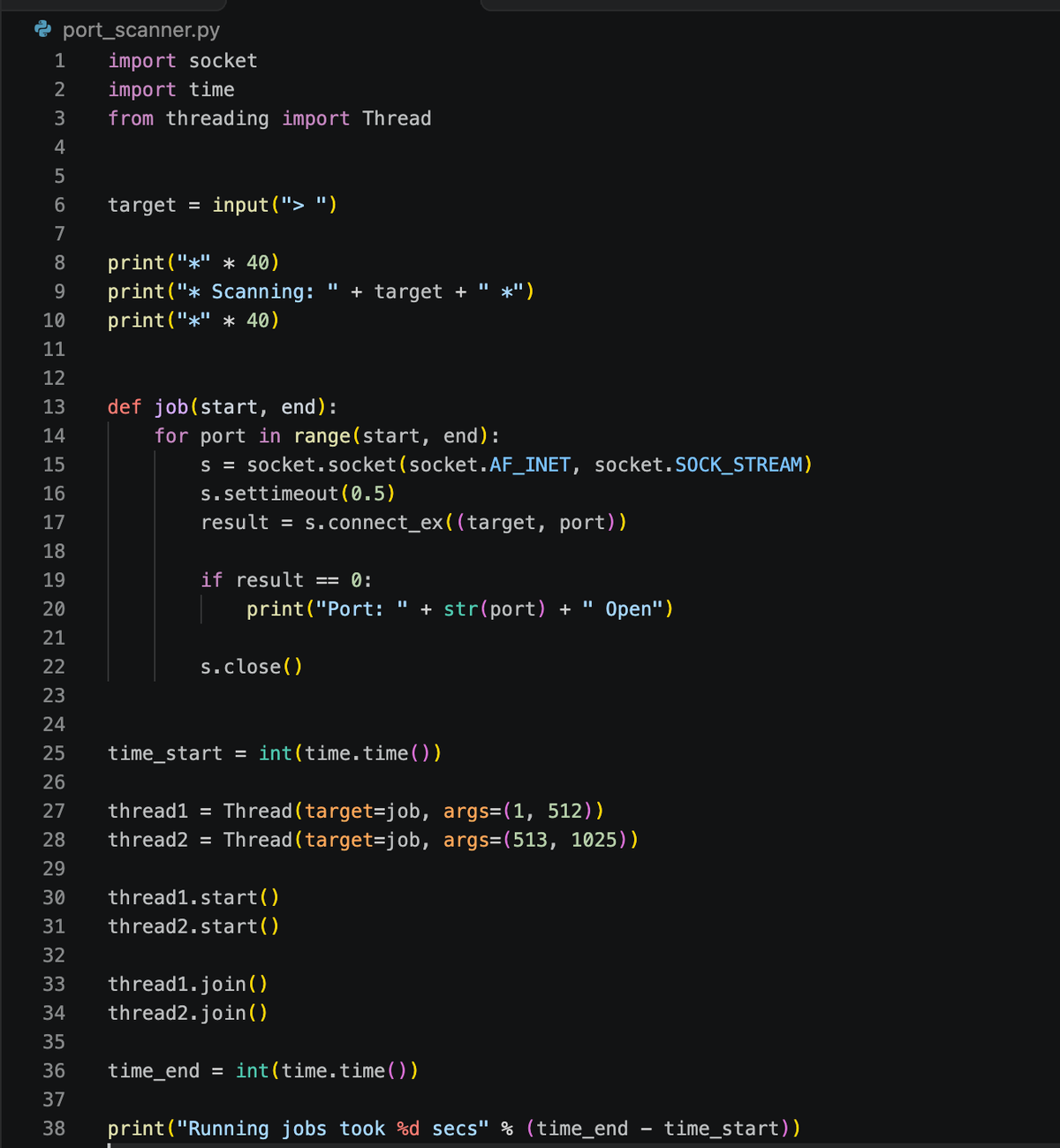
My scanner needed to take an IP address, attempt connections to different ports, and report which ones accepted a connection. For testing, I used my phone’s IP address, so I was scanning my own machine.
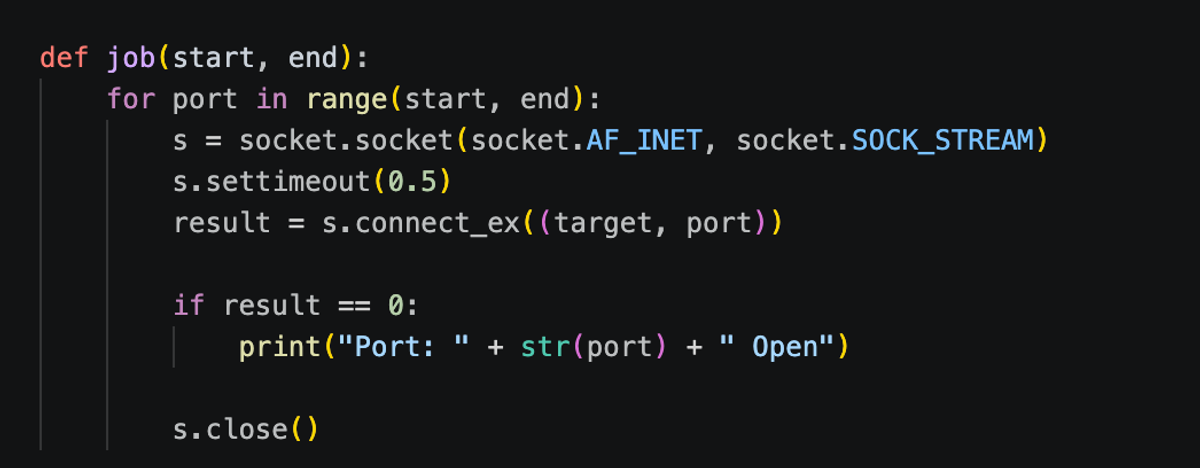
The main part of the scanner was a function called ‘job’ which took two parameters: ‘start’ and ‘end’. These determined the range of ports I wanted to scan.
The ‘for’ loop meant I didn’t have to manually write out a connection attempt for every single port. Instead, Python would repeat the instructions for each port in the range of ‘start’ & ‘end’.
Inside the loop I created a socket and assigned it to ‘s’, ‘AF_INET’ means IPV4, and ‘SOCK_STREAM’ means a TCP stream.
The next line was where the actual connection happened. The ‘target’ was the IP address I entered and the port was whichever port the loop was currently checking for. The ‘connect_ex()’ method attempted a tcp connection and if that result was 0, then the connection had succeeded!
Finally s.close() closed the socket regardless of whether the connection was a success or a failure.
Baby’s First Steps, Followed by Baby’s Pitfalls
I ran the scanner and got my result:
Port 853 Open
Running job took 15 secs
Everything here made sense, so naturally I started trying to run.
I wanted to take the lab’s challenge and speed things up.
The idea was to use threading to divide 1,024 ports between two functions simultaneously rather than having one function work through the entire range on its own. I understood why that might be useful, but what I didn’t understand was how Python was actually passing the instructions around.
I’d already defined ‘job(start, end), but where exactly were start and end getting their values? Did I need to call the function myself? Was Python supposed to figure it out? How does your arm figure out which way to go as your feet start tumbling forward?
My first instinct was to write ‘target=job(1, 512), because how else was the thread supposed to know what I wanted it to do? I couldn’t just hand it a function and expect it to figure out the rest… Could I?
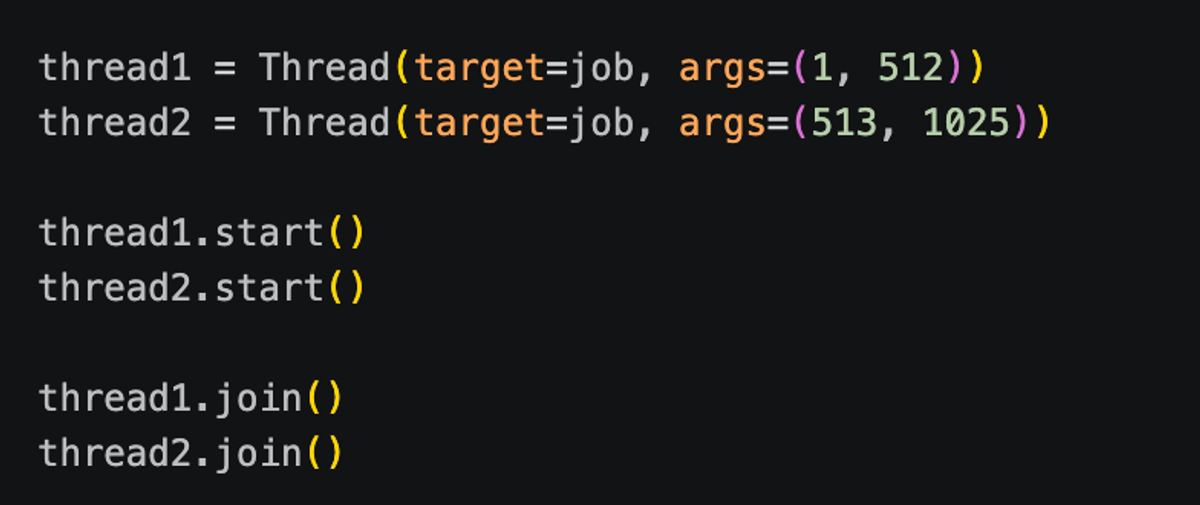
Except I could! I just needed to hand it the arguments too. What I hadn’t understood was the difference between calling a function and passing a function to a thread.
Essentially I was trying to force my brain to figure out all the walking on behalf of my legs rather than letting them do their job. (pun intended)
Writing ‘job(1, 512) meant I was executing the function immediately before the thread even got a chance to do anything. Writing ‘target=job’, on the other hand, gave the thread the function to execute while ‘args=(1, 512)’ told it which values to use for start and end.
Target? Which Target?
Of course, that wasn’t the only thing I’d managed to misunderstand.
If you remember that at the beginning of the program, I had created a variable ‘target’ to store the IP address entered by the user. Simple right? The target is the computer I’m scanning.
Then, inside the scanning function,‘target’ was also being used to tell the thread which function to run?
Surely that had something to do with the same target right? Nope. Not even a little.
After an hour of reddit rabbit holes, it turned out that they were two completely unrelated things, sharing the same name, appearing in the same program, and expecting me to just know the difference.
Talk about one foot forward, two feet backwards!
By now, I’d managed to get my scanner working, divide the workload between two threads, and successfully identify open ports on my own devices.
But something was still bugging me:
Port 853 Open
A quick search told me that port 853 is commonly associated with DNS over TLS. Interesting, but that didn’t necessarily mean my phone was running a DNS server. My limited attention span had found its new target.
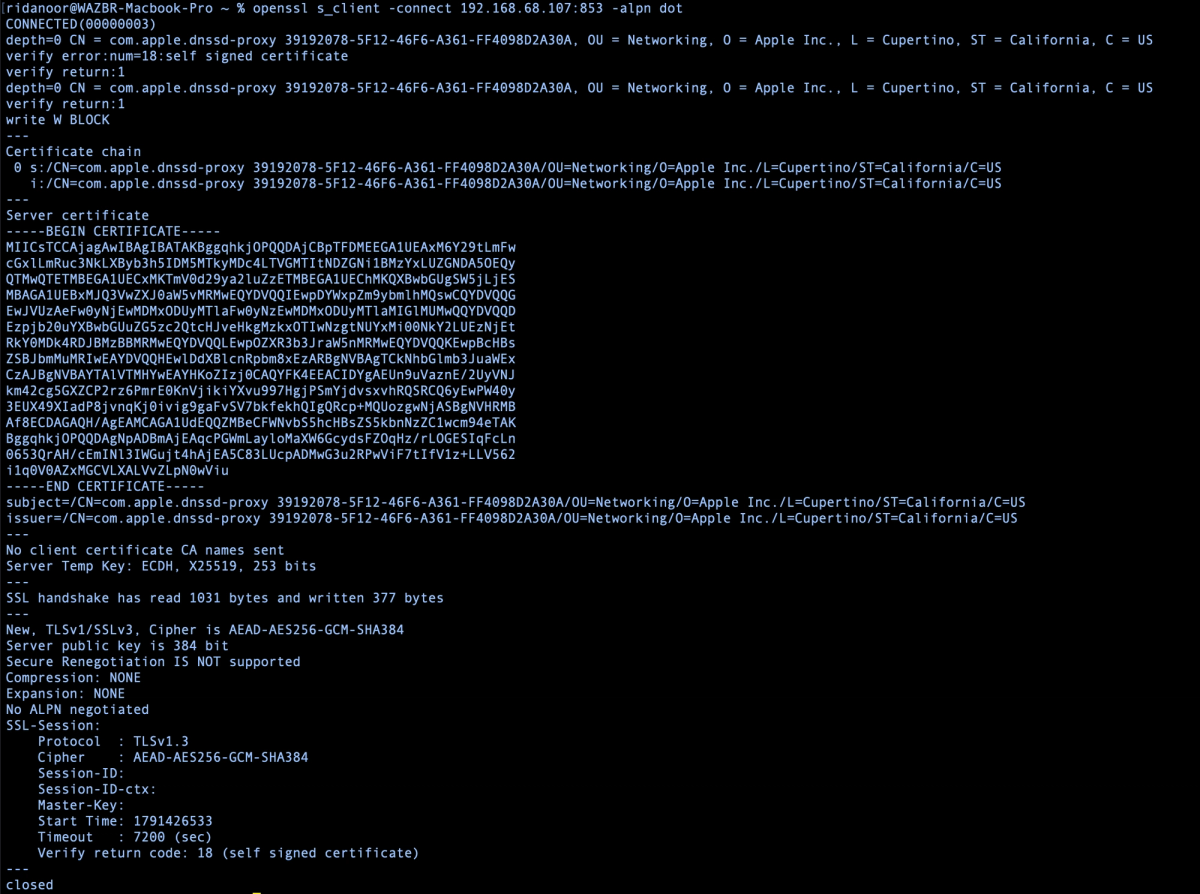
I started with ‘netcat’ to confirm the port was actually accepting connections, then used OpenSSL to investigate what was listening on the other end. I tried sending DNS queries, checking which services were being used and even disabling my Personal Hotspot and AirPlay & Continuity to see whether the port would close. It didn’t.
The funniest part is, after all that investigating, I still can’t tell you exactly why my iPhone has port 853 open.
But I can tell you that it accepts TCP connections, supports TLS, presents a self-signed certificate identifying an Apple networking component, and doesn’t respond to the standard DNS queries I tried sending it.
And that’s considerably more than what I knew when my scanner first printed those three little words.
Finding My Balance
What started as a simple Python lab ended with me learning quite a bit about a service I hadn’t even known existed.
Finding an open port is only the beginning of understanding what’s actually happening behind it. My scanner could tell me where to look, but figuring out what I was looking at was an entirely different challenge.
I suppose that’s the thing about a baby’s first steps. The goal isn’t to get very far, it’s to discover just how far you can go.
For me, those steps lead right down a rabbit hole.
Gallery
Comments
Loading comments...